What’s the difference between Playwright IDE and typical IDEs like IDEA and VS Code?
.svg)
IDEA and VS Code are traditional coding environments, designed for writing and maintaining source code across many languages and frameworks.
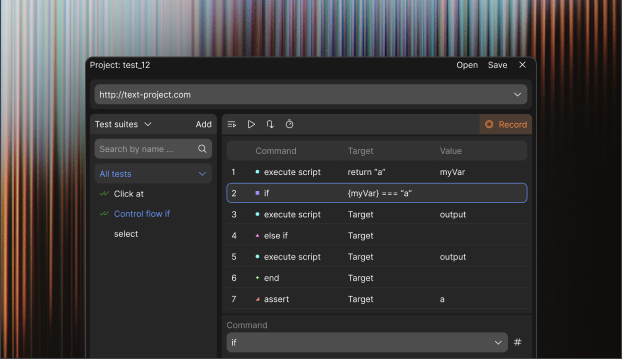
Playwright IDE is a no-code testing tool, focused on creating, running, and managing Playwright tests through a visual, table-based interface. Instead of writing test code, users define test steps, actions, and assertions in a structured UI, making test automation accessible to QA engineers and non-developers.
How Playwright IDE differs from Selenium IDE?
Playwright IDE uses a similar table format for tests as Selenium IDE, so it feels familiar if you've used that before. The main difference is it runs on Playwright, which handles modern websites more reliably and with fewer issues. It also includes options like manual steps and small code additions for handling complex parts.
Playwright vs Playwright IDE: framework or no-code tool?
Playwright is a developer framework for writing automated UI tests in code.
Playwright IDE is a no-code layer on top of it - it lets manual QA engineers record actions, add manual or coded steps, and export them into Playwright scripts without writing any code.
How does the manual step feature work in Playwright IDE?
With Manual Steps, you can add a row in your test table that pauses the automation and shows instructions for a manual check, such as "Look at the email and confirm it's correct." After you do the check and continue, the test picks up from there. This works well for situations where automation alone isn't enough, and you don't need to code for it.
Is coding required to use Playwright IDE?
No, coding isn't required. You can record and run tests without writing any code, similar to Selenium IDE, while using Playwright for better performance. If a step needs adjustment, you have the option to add a short code snippet in the table.
How do I set up CI/CD with Playwright IDE?
To set up CI/CD, export your tests as Playwright files and add them to a tool like GitHub Actions or Jenkins. The process involves a few basic steps, and there are guides to help. This way, tests can run automatically without much coding involved.
How does exporting to Playwright work in Playwright IDE?
Exporting turns your table-based test into Playwright code with a single click. You can also import tests from Selenium IDE to get started. This allows you to use the code for more advanced testing or across different browsers if needed.


.svg)
.svg)


.svg)